AP7 connected to managed switches two layers down. Is it possible?

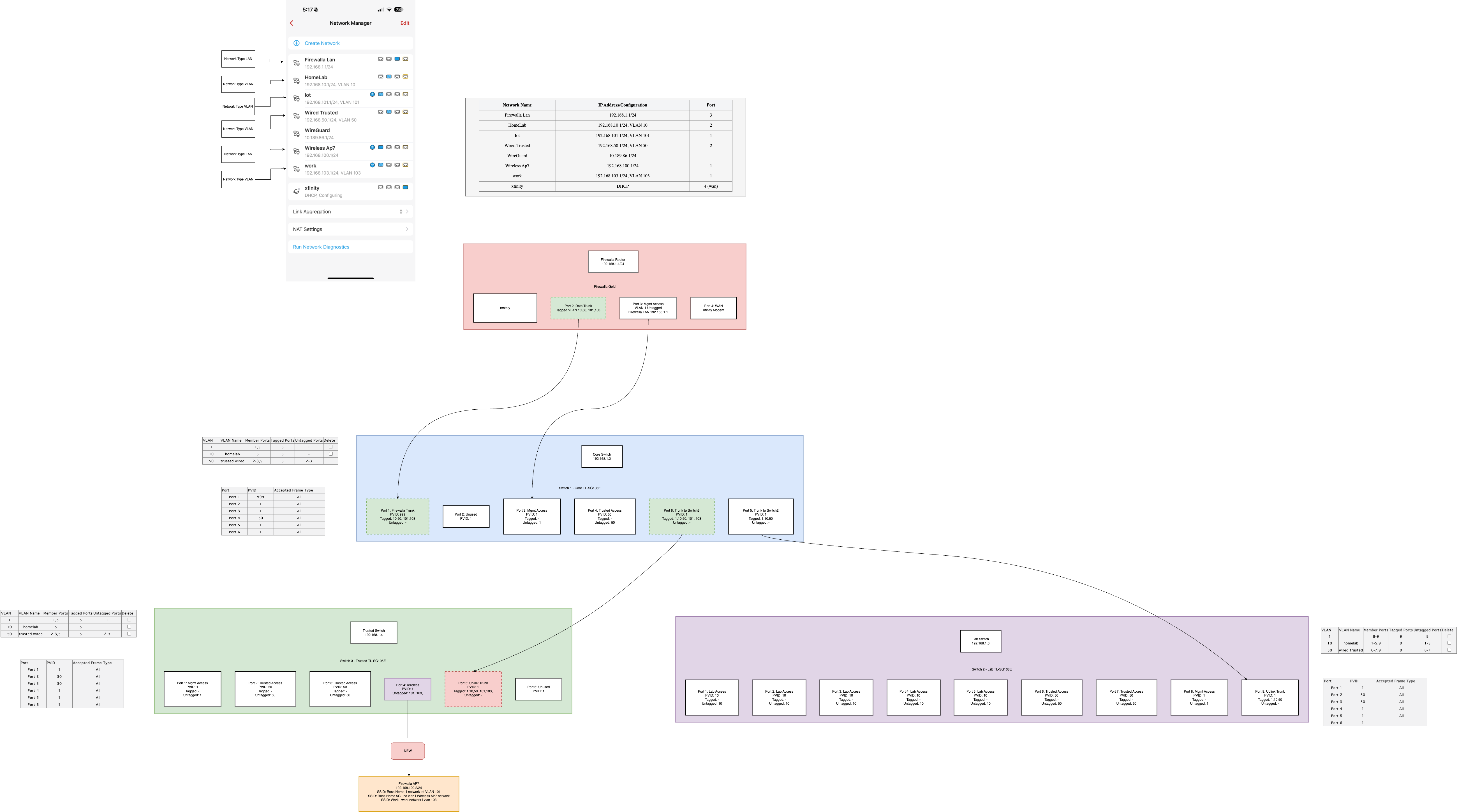
Im having a very hard time getting the firewalla AP7 to work downstream on a managed switch. My current working setup has the Firewalla AP7 on port1 and disconnected from any switch. See here https://i.imgur.com/T8SleeP.png
What I want to do is connect my AP7 to switch 3, port 4 ( the green box ). my house wasnt wired for ethernet so I have only two main ethernet runs in my home. So I want to put the AP in a better spot in my home which requires going thru a switch thats two hops away from the Firewalla
(ap7) -> switch 3 -> switch 1 -> firewalla
I have tried all sorts of differnt ways of VLAN tagging all the ports. For sake of discussion ive omitted all these attempts from my published diagram to reduce confusion. Ultimately, Im trying to figure out how I would add the AP7 with vlans down stream.
-
Should be able to download this image, expand and zoom.. its a PNG exported drawio... you can also upload PNG back to draw IO..
my issue is if i try to plug into a port on a switch , behind a switch, I have all the trunk ports forwarding the vlanIDs, the AP7 still wont connect. Wifi will be available, but if you connect to the wifi you cant get a DHCP IP.
Im trying to figure out on firewalla side if im doing something wrong.
it would be super super helpful if the Firewalla team could write a better guide/blog post on this because I think this issue is going to pop up more often then not. Im happy to provide logs, pings, traceroutes , whatever you need to debug this!
Thanks!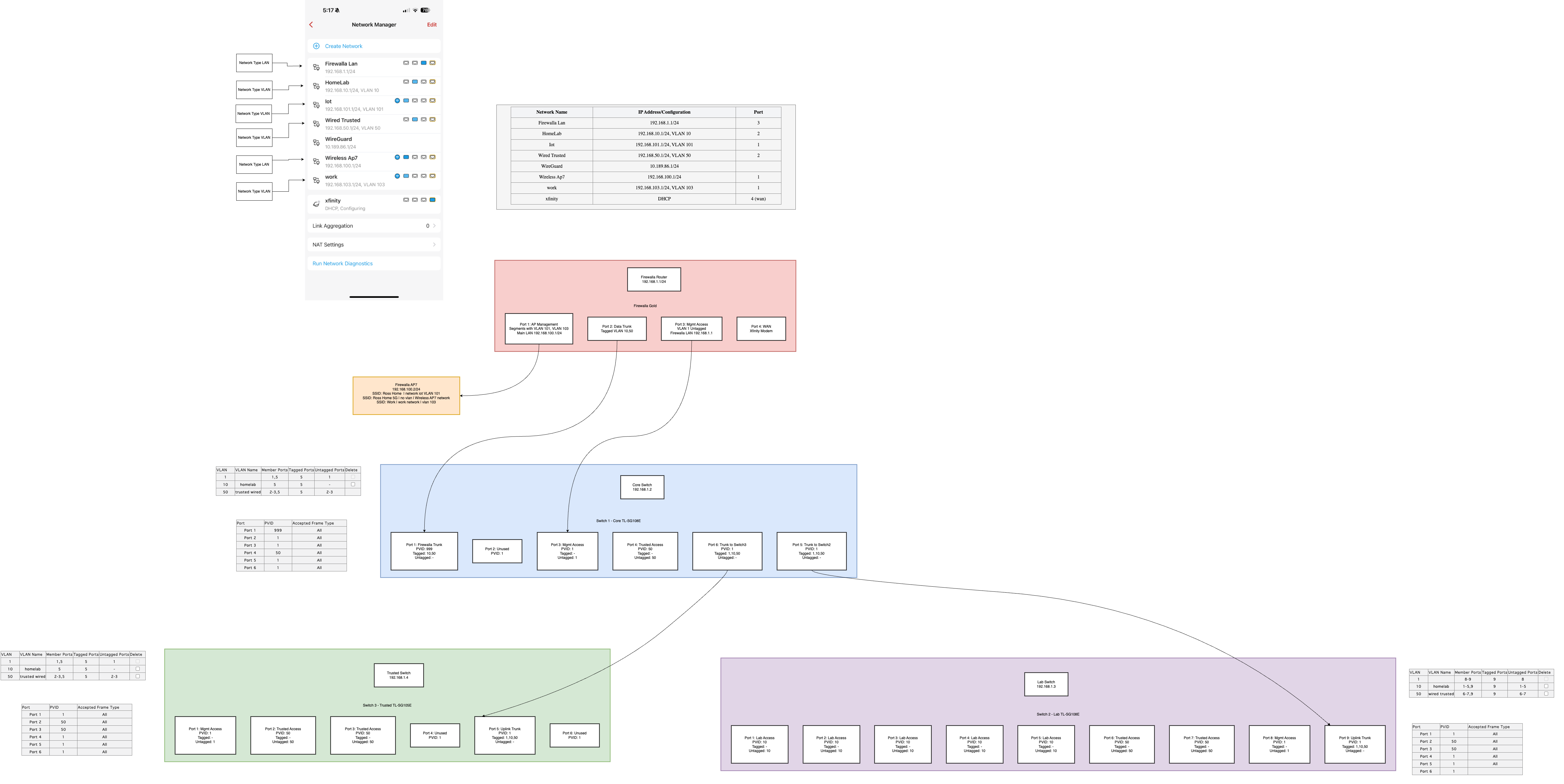
-

The only requirement for connecting the AP7 is simply to make sure the (no VLAN tag) can DHCP. This will ensure the AP unit can be managed by the the controller. If you go to the app and you see "green" dot next to your wifi access point, then it is connected.
The next part is VLAN, if you are using them and mapping SSID to VLAN, you will need to configure that via your switches, I assume this is your issue.
-

I think you have a switch config problem.
Based on the Firewalla config, I think port 1 should be plugged into a switch trunk port but the untagged/native vlan should be something other than 1. Let’s call this vlan100 on your switch. Make sure you’re forwarding vlan 100 to the other switches. Where the ap7 plugs in should also be untagged vlan 100. I think it can be an untagged access port on vlan 100 or a trunked port with untagged/native vlan 100. I’m making assumptions so I may be incorrect. This should be similar to how other controller based access points operate. -
I don’t think you need a diagram as much as the configuration. Your diagram looks fine. Plug Firewalla port 1 which you already had configured to core switch port 2 and configure switch port 2 with tagged vlan for your sssid traffic vlans 101 and 103 and your untagged vlan 100 or native vlan 100 for your ap7. Then your ap7 plugged into switch 2 would be vlan 100 untagged. I wasn’t able to get in on the ap7 desktop purchase so making assumptions and hope this info
Works/helps. You’re separating the ap7 and controller traffic to vlan 100 while your Firewalla management stays on untagged vlan 1. -

I'm trying to learn from this conversation, therefore not trying to interfere.
Probably a minor detail but if I compare the FW App Port assignment, it reflects port 1 assigned 3 times. The red FW Router diagram indicates port 1 as empty. Some of the FW port 2 VLAN ID's are attached to port 1 of the FW app. These may be just diagram differences but may also be actual setup differences. Again, just trying to follow the problem and solution.
Very interesting discussion
@Mitch Ross
Would be great if you could update the diagram once issue is solved and publish again. Thank you.
-
@DanM still trying to solve, but the idea was plug AP7 in port 1 on firewalla and just get the home working. Remove the switch from the equation. Have the switch vlan aware for later.
So pic 1 just shows the AP working.
Pic 2, revised is where I was going to move the AP to the switch 3 down the line because its in a better spot in my house this way.
I figured since I Router/Firewalla-> switch 1 is done over one port, and my computers and other switches down stream all work fine, then i thought ok my wired network works and my old wireless ( non vlan aware ) was on switch 3, then plugging in AP7 to the spot where my wireless was before, and vlan'd ( just a dumb netfear wifi mesh ), then plugging in AP7 should just work. The only net change here is that AP7 is ssid/vlan aware so u can have many wifi vlans and all i would need to do is carry that tagged traffic back up to the router, but it just straight up doesnt work. -
Maybe we’re overthinking this. Firewalla was configured correctly.
Plug in Firewalla port 1 to port 2 on switch. Switch configured with pvid 100/vlan 100 untagged.
Do the same on trusted switch port 4. Remove the vlan 101 and 103. They don’t traverse the switches. Should be tunneled in vlan 100.
and make sure vlan 100 is forwarded across the switches. -
Firewalla port 1 only had the AP on it, so the idea was to REMOVE port 1 from equation, and have port 2 on the firewalla which is currently connect to the switches remain the only connection from firewalla to switch sets.. Port 1 would be an emergency i bricked my switches lets get wifi back online.
I guess a clarifying question. Does the AP7 HAVE to have a lan network or can the whole thing be VLAN? when you add the ssids they ask for a network ( we can chose vlans ) but does the actual AP7 need a LAN?
In my first screenshot of my diagram, I had the firewalla port 1 be a LAN for wifi
Question 1, could port 1 just be a VLAN? and if I kept my firewalla ap7 on port 1 with no switches would it work?
Question 2, If yes, then I should just be able to goto my switch 1, and switch3, tag the vlan ports from switch to switch .. because if wifi is vlan 100 -> it goes out of AP -> to switch PORT as Tagged, so we set the port that its plugged into in this case, switch 3 port 4 tagged with all the vlans( 100,101, etc)... Now switch 3 has to get back to switch 1, over switch 2 trunk port, with tagged ports, and over to switch 1 with switch 1 tagged ports. Now switch 1 has to get to to firewalla router ( via port 1 on switch 1 to router to port 2 firewalla ).
Having a hard time understanding why vlan 101 and 103 wouldnt traverse switches if the AP is 2 layers deep?
Please bear with me im really trying to understand this at its core. -
it has to be physical lan and not virtual lan for the controller to function. VLAN 101 and 103 are there so the controller is aware of them. They do not traverse your network unless you use the same vlan for wired traffic. The wifi traffic from the AP7 is tunneled to the controller and traffic routed in the Firewalla.
the physical lan is untagged traffic. just like you configure untagged vlan 50 to your trusted wired device, you would configure untagged vlan 100 to your AP and Controller. Switch to switch traffic you will forward all untagged vlans as tagged.
if you want to give this a try based off your second pic,
Firewalla port 2 to Switch Core port 1, Wireless AP7 LAN, vlan 101 SSID Iot, vlan 103 SSID work, vlan 10, vlan 50
Switch Core, port 1 to FW port 2, PVID 100, Untagged vlan 100, tagged 10, tagged 50
Switch Core, port 6 to Trusted Switch port 5, PVID 1, tagged 10, tagged 50, tagged 100
Trusted Switch, port 5 to Switch Core port 6, PVID 1, tagged 10, tagged 50, tagged 100
Trusted Switch, port 4 to AP7, PVID 100, untagged 100If that doesnt work then I would go back to your first pic and configure port 1 for the AP
Firewalla port 1 to Switch Core port 2, Wireless AP7 LAN, vlan 101 SSID Iot, vlan 103 SSID work
Firewalla port 2 to Switch Core port 1, vlan 10, vlan 50
Switch Core, port 2 to FW port 1, PVID 100, Untagged vlan 100
Switch Core, port 1 to FW port 2, tagged 10, tagged 50
Switch Core, port 6 to Trusted Switch port 5, PVID 1, tagged 10, tagged 50, tagged 100
Trusted Switch, port 5 to Switch Core port 6, PVID 1, tagged 10, tagged 50, tagged 100
Trusted Switch, port 4 to AP7, PVID 100, untagged 100I hope this works for you.
Maybe some of the other AP7 admins can chime in. I'm flying blind, lol.
-
I finally got it working.
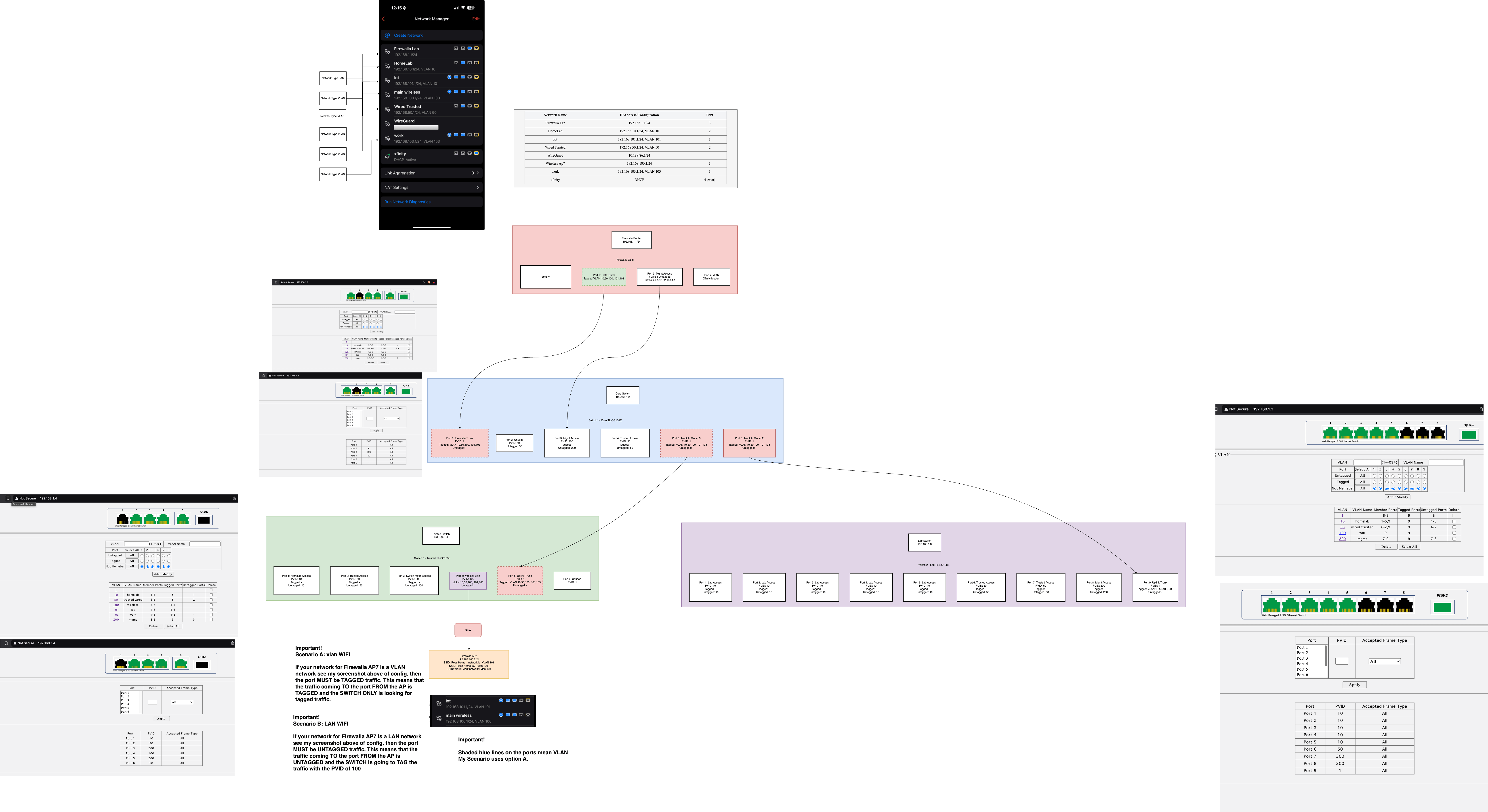
https://i.imgur.com/fWhkO4J.png ( higher res link ) -

Good Job!
Yeah, like ngen47 said, the first or only Firewall Access Point must connect to the LAN port(Local network without VLAN) of the Firewall box via an Ethernet cable. This is to ensure that the box has control over the AP no matter what WiFi network configuration you set, even if you shut down WiFi via Frewalla App(on our to-do list).
After that, you can create VLANs on the same port as how you often set VLANs. That's the key point of your original diagram (connecting Gold port 1 to your switch will also work).
-

@Mitch Ross - can you show us your ingress filtering setup on the Sodola switches. I have several of these hanging off my core 10g switches.
I do note that this requires VLAN1/PVID1 in order to work and that you use a lot of untagged traffic which is not what I have on my network setup. I don't enable VLAN1/PVID1 on any switches in my network so this has been a big issue for me.
Thanks for the pics and the details. At least I know that the Sodola switches are not unique and do work with a VLAN1/PVID1 configuration.
-
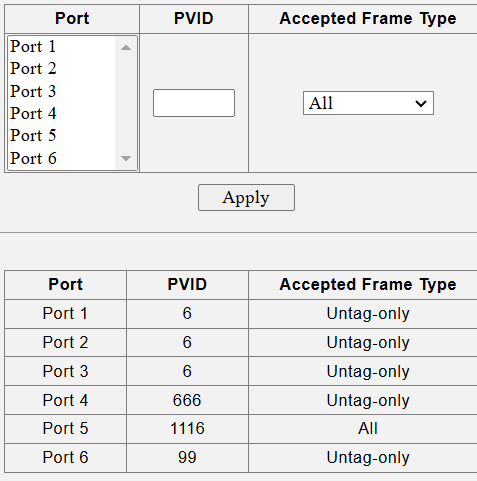
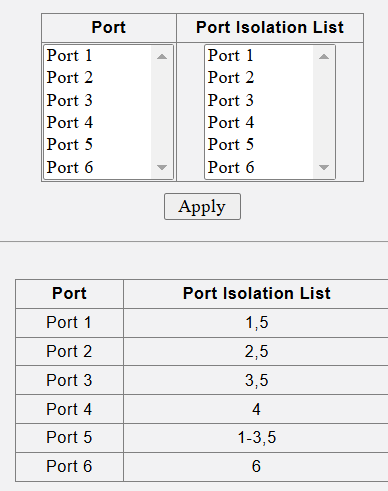
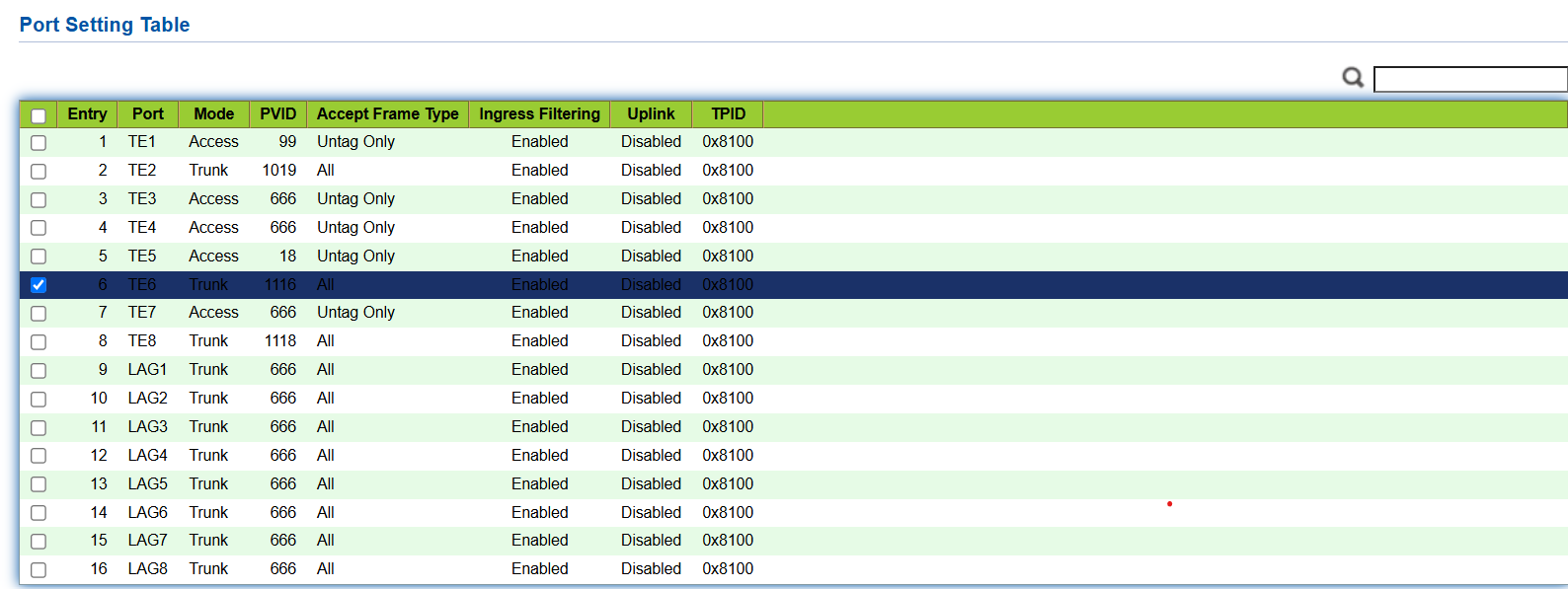
on your 6-port 2.5gb switches you use port Isolation. On a larger sodoal 8-port 10g switch you use ingress filtering and port isolation. Note: you will not see PVID1/VLAN1/Native VLAN on any of my switch configurations. Which is why I can't put an AP7 on a lower level switch for installation. I was told that even if I config it directly on the AP7 I could move it to VLAN only but I could not get this to work either.
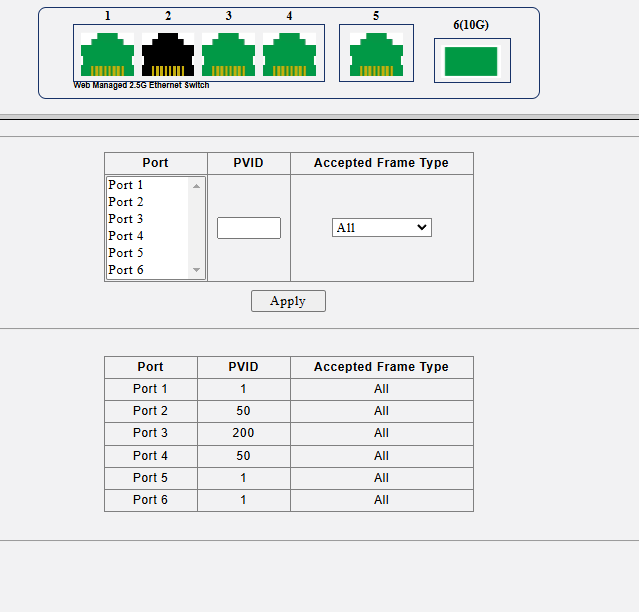
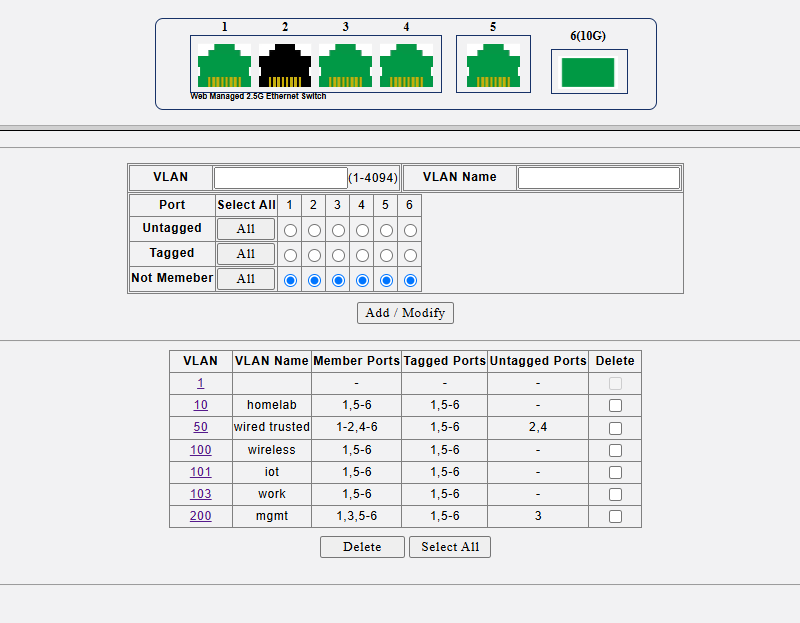

Please sign in to leave a comment.
Comments
23 comments