Plex vs AP7

While still trying to digest all the new features with AP7, one question specific to Plex has been bothering me.
I use Plex on our TV and to do so, I had to put the TV on the same network as the Plex server. No choice, Plex TV app needs to talk to the Plex server, yet it exposes the network and the Plex server (NAS) to potential bad apps on the TV.
Would it be possible to isolate the TV within the network, except for anything Plex?
The traffic analysis between the TV and the NAS does not show anything specific to Plex, only ports, that's a start, I think I read there will be options to limit traffic to specific ports, but it still exposes the server to the TV if we are not able to specifically isolate Plex traffic only.
-

Do you mean, you don't want your TV to talk to anything on the LAN besides your Plex server? This is possible with VqLAN once we made the allow feature.
Today you can put TV and Plex server in the same group and turn VqLAN on, that will microsegment both together. And in a month or so, you can isolate the TV and only allow your Plex server to talk to it.
-
Correct, I would not even want the TV to be able to talk to the server other than the Plex server app on the server (NAS).
From what I've seen so far, it talks to port 32400 which is the standard Plex port, a little to 5000 which is the standard Synology OS port which may or may not be required, and 50001 which is a DNLA port but that's probably not needed by the app, that's just the TV which found PLEX as a DNLA server I think.
So in theory, using ports segregation if that feature is available, I could only allow the TV to talk to just 32400, maybe 5000 if required.
TV's are notorious for being unsafe and/or snooping where they should not be so I want to barricade it as much as possible. However since the Plex server is the main files server as well, with a bunch of other applications running on it, it can't be isolated from the other devices, PC's, phones, tablets, surveillance cams, so microsegmenting the TV and the NAS together would probably not work, unless in the future there was a way to partially join together several microsegments, like so. The NAS is wired to the router so it would not be talking to the AP7 directly, the TV and other devices would.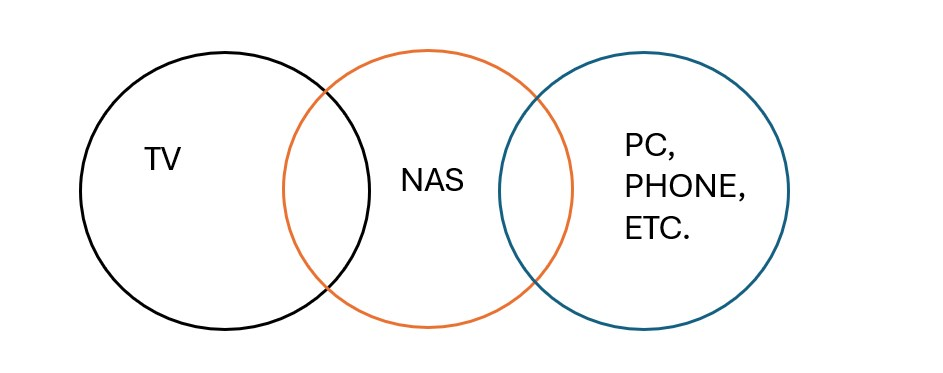
-
When you receive the AP7 unit, the VqLAN feature can isolate devices or device groups. And may be a week or two later, you should get "allow" device feature.
So with above, you can do PC/Phone/ in one group (turn VqLAN on)
NAS: turn on isolation
TV: turn on isolation
Then on the TV side you can allow NAS.
There is no port configuration for LAN side yet, but it is possible to add it; we are just keeping things simple for now

Please sign in to leave a comment.
Comments
8 comments