Device changes group (because IP changes?)

My devices keep changing their group association behind my back. My personal computer keeps getting reassigned to the kids' group and subjects me to my own draconian parental controls.
SETUP:
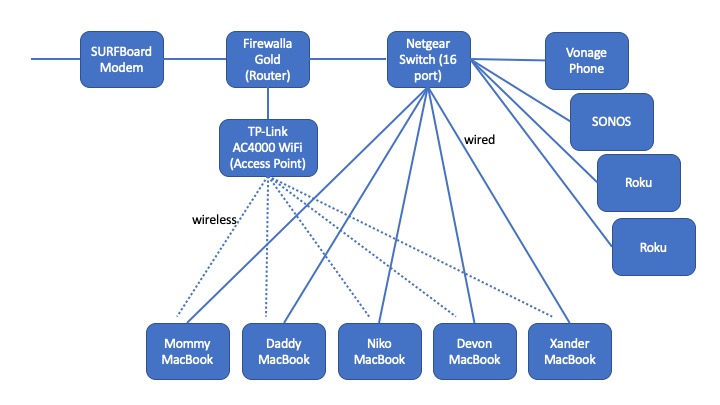
Firewalla Gold as router connected to SURFBoard modem. TP Link AC4000 for WIFI setup as access point from Firewalla.
We have 5 Apple MacBooks, 2 adult and 3 kids. Each computer shows up twice in the device list, once for the wireless and once for the wired. We use wired extensively to minimize capacity conflict for distance learning zoom classes, but the boys like to switch to wireless, so both get used at different times.
We have 5 Firewalla groups (Mommy, Daddy, Niko, Devon & Xander), each with 2 devices (the wired and wireless ip addresses) so that I can assign rules once (e.g., to Niko group) and have those rules apply to both the wired and wireless device for Niko.
PROBLEM:
From time to time I find that Firewalla will reassign a Daddy device to the Niko group. Or a Niko device will disconnect from his group. Usually I discover the problem when my computer suddenly won't allow me to watch videos (a Niko group Block).
We occasionally restart our MacBooks. And as mentioned above they switch from wired to wireless and back. Because of this the machines get reassigned IP addresses, and it is my assumption that the IP address reassignment is causing the group reassignment.
In any case, I was wondering if there is a workaround or a fix for this problem.
Thanks,
Wallace Mann
P.S. Otherwise Firewalla is a blessing. It's the first parental control device that has given us some measure of control over game playing by our ADHD game-addicted triplets. Thank you for that.
-

Sorry about the problems; is the problems mainly with macbooks? Do you have any other devices in the home that does network extender or another router behind firewalla gold? if not, we need need to look inside. Can you please send an email to help@firewalla.com, we may need support access. Please reference to this thread when you send the email, so you don't have type everything again.
-
I have attached an image showing our network layout. The only other "router" is the TP-LINK, but it has been set up as an access point.
All of our personal computers are MacBooks. If the problem is occuring with other devices I would not know because we only put device controls on the MacBooks. The MacBooks are different ages (ranging from brand new to 2014) and different OS (ranging from Majove to Catalina).
-
We took our Firewalla to a rental home for 2 days because of a power outage at home. Then we came home and brought it back. Everything worked, but ... oh, my, it's like all the device groups got scrambled. Devices got dropped from groups. Devices got moved into a different group. Rules stayed with the group, but it meant that for a few hours most of our machines were either abnormally blocked or abnormally permissive.
I'm surprised more people aren't experiencing this. It's both annoying and common for us. And I'm shocked that this can't be easily prevented since you have access to the mac address. I can understand how by disassembling and moving my network all the IP addresses get scrambled, but why this confuses Firewalla so much is surprising.
-

I found our other problem! It was the DONGLES!
We did have phones using MAC address randomization (not any more), but we had yet another problem. All of our computers are MacBooks which actually do not use randomization. But all of our computers use hardwired Cat5 ethernet via j5create usb-c docking stations and ... the MAC address lives in the dongle. Not realizing this was an issue, during the course of a week and moving machines around, we occasionally swapped dongles. When we moved to and from the rental house, moving the whole setup resulted in mass dongle swapping and thus mass group re-assignment.
There's probably a feature request in here somewhere, maybe the ability to alert when a computer of a given name changes group, but for now we can defend against the issue with careful dongle management.
Please sign in to leave a comment.
Comments
9 comments