Firewalla Gold, Orbi Wifi 6 and ATT U-Verse Fiber router - HELP!!

Firewalla = Fireguerilla
What an absolute nightmare trying to get this to work.
For near $500 US, you’d think this thing would unpack and install itself while fanning me as it also prepared me a cool one…well, not so fast….for the uninitiated, this has been a nightmare of Fire-walla proportions!!!
How do I configure the FW in DHCP mode with a new Orbi 6 Mesh WiFi (guessing in AP mode) and an ATT Uverse gateway (5268AC)...I can't turn of DHCP on the Orbi so I used it as an AP and tried using the FW as a router, and I would drop connection literally every 15-30 seconds. I put it simple mode, but it still is finicky? Beyond turning off the WiFi signal on the gateway, is there some other firewall setting I need to be adjusting? This shouldn't be this hard :((
-

First thing first, you will need to design you network a bit, and see how to insert the Gold.
Given what you have
1. ATT Modem 5268
2. Gold
3. Orbi 6 Mesh
The best way and the most optimal way is use the router mode.
[ATT Modem in bridge mode] <---->[Gold in router mode]<---->[Orbi 6 Mesh in AP mode]
This is the simplest configuration and it will be most optimal and likely pretty easy to configure. Will this work for you?
-
Thanks for the quick reply!
I've been figuring that the issue has been with the ATT UVerse gateway (Pace LLC, model 5268AC)....I don't see how to put in "bridge mode." Is there some other is the term "bridge mode" has some other description or technical term that is not obvious? Should I change the pinhole/passthrough options to DMZplus? thanks
-
We don't know much about the PAC5268 much either, this thread seems to point to DMZ+ ... not sure what it is ... https://forums.att.com/conversations/att-fiber-equipment/how-to-run-pace-5268ac-in-simple-bridge-mode/5defc61cbad5f2f6061e835a
I think the best strategy for you is doing this first
[ATT Modem ... as it is router mode] <--->[Gold in router mode]<---> [Orbi 6 mesh in AP mode]
This should get you going until get ATT into a better mode.
-

I had read that the att customers with the pace router needed to upgrade to the Arris BGW710-500 modem which supports IP pass through.
https://forums.att.com/conversations/att-internet-features/trying-to-cascade-arris-bgw210-to-another-router-need-help-with-the-network-address/5ee33239917fbb258155b339I am using the BGW with att using ip passthrough with gigabit with no issues with the FWG.
-

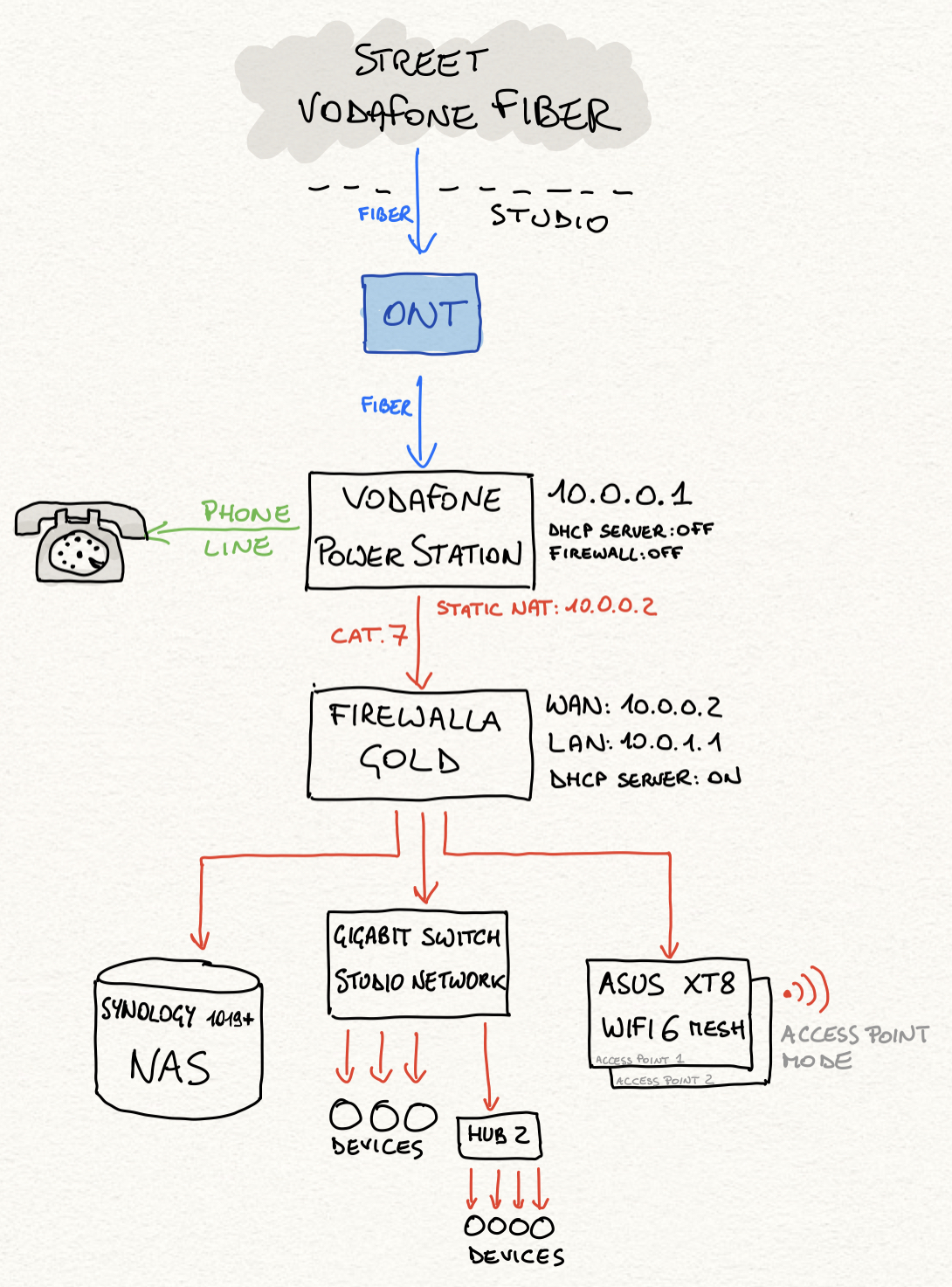
This is my network configuration: unluckily the VF Power Station cannot work in bridge mode, so the only way is using Static NAT (and I need to maintain the VF Station for traditional voice traffic, unluckily). Yet my current configuration workd 99% ok (I cannot have my old torrent clients working in dynamic NAT, with correctly natted ports - hope to solve this one)
Please sign in to leave a comment.
Comments
5 comments