New Firewalla Gold SE install -- Sanity Check

Looking for a sanity check and inputs on my proposed network topology based around our new FireWalla Gold SE.
I’m a networking neophyte so trying to make sure I don’t drop myself into a black hole when I start hooking this up. I’ve read most of the FireWalla help articles and spent a lot of time in the community posts…so I’m fairly informed, but now probably more dangerous!
THANK YOU in advance for any help and feedback.
Current network & data security setup:
- Network topology: FIOS 1GB ONT -> Eero Pro 6+ -> PoE switch -> 2 Eero 6 PoE APs.
- Every device connects to the network via the main PoE switch, multiple ethernet runs, additional unmanaged switches, and the Eero WiFi network.
- We have dozens of personal, IoT, streaming, hobby, & home automation devices.
- We employ strong personal data security actions: computer-generated 16-character strong passwords for everything; we keep our IoT devices’ firmware/Apps and our personal devices’ OS/iOS current; we use encryption between our personal devices and the Apple iCloud; we use two factor account log-in validation for all our important personal and financial accounts.
New network design goals:
- Protect with a high (not highest) level of confidence our important and at-risk personal information (password program data, personal files, etc) on our personal devices (i.e., iMac desktop, Macbooks, iPads & iPhones).
- Implement a simple, robust, reliable, and 90-ish% network security solution. I don’t want to become a network expert and I don’t want to have to deal with my network on a routine basis. I want as close to “set and monitor occasionally” as I can get. That’s why I’m targeting a 90-ish% and not a 99% solution. I’ve got to balance risk with ease of setup, usability, and reliability. My intent is to avoid employing VLANs and still meet my objectives and 90-ish% goal.
- To access and operate our many ethernet- and WiFi-based home automation devices (many of which ONLY use iPhone/iPad apps to setup and interface with their devices), I feel like we have to accept the risk of letting our WiFi IoT devices and our personal iPhones and iPads operate on the same WiFi network. Which means I’m depending on Apple device security on our iPhones/iPads.
Planned new network topology:
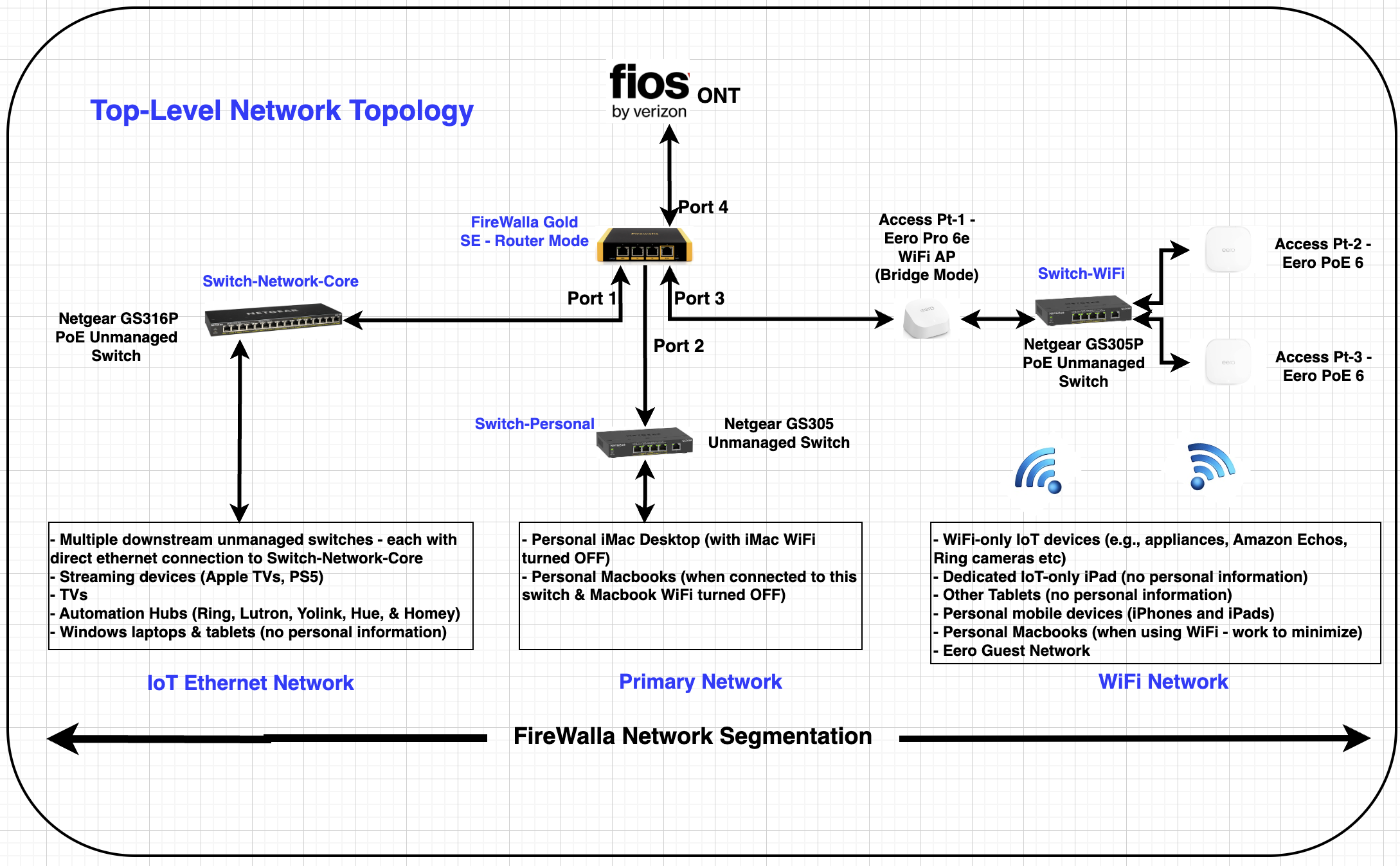
Ok, here’s where it gets interesting and I’m not 100% sure of my choices. For FireWalla Rules implementation below is what I’m initially thinking for specific Blocking/Allowing of inter-network and internet access connectivity:
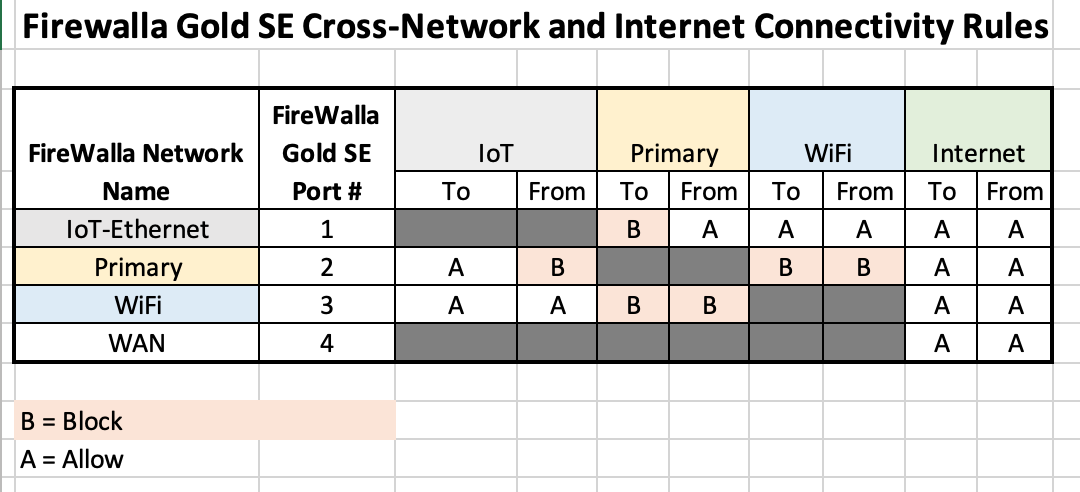
Should I also consider incorporating some “device specific” rules to further augment the network-level rules?
Again, feedback and insights are GREATLY appreciated.
Cheers, Jon
-

@Jon, it sounds like you want to isolate the primary network from accessing the other two networks but access it from the IoT network. It's easy to do with two rules.
1. Block local traffic from & to all local networks, applied to the primary network
2. Allow local traffic from the IoT network, applied to the primary network
In the future, the group can help if you want to give exceptions or higher-level protection to any devices. The keys are 'block' as the baseline and 'allow 'as the exception.- The priority of different levels is Device > Group > Network > Global
- At the same level, allow rules take precedence over block rules.
Additionally, I would suggest introducing another cheap AP for those WiFi-only IoT devices in IoT network. Make IoT network for IoT and WiFi network for personal device only. iCloud encryption, like iCloud private relay, can't really restrict local access but hides things from being seen by your Gold SE. Firewalla protection won't fully work on those Apple devices.
Please sign in to leave a comment.
Comments
1 comment