Custom DNS Entries Not Resolving

I have a FWG (box version 1.977, stable/non-beta), and recently I have entered some custom dns entries via the app that point to resources on the LAN. However, they do not seem to be resolving consistently.
Initially, I added a domain that was not defined on an upstream nameserver, such as localservice.mydomain.com. This worked as expected.
I then proceeded to add a couple local entries for some FQNs defined upstream, such as plex.mydomain.com. The hope was that locally devices would be able to resolve plex where it was hosted internally. I added these via the app and now no local domains seem to resolve as expected.
To troubleshoot, I did try rebooting the FWG which did not seem to help. I can see the files that the saved custom dns app configuration has written in the dnsmasq configuration folder, and the firerouter_dns and all subprocesses appear to be running without issues. I have noticed the dns service appears to reload itself every few minutes, but perhaps this is expected in order to pick up newly saved configurations from the app.
With that said, I'm at a loss of why this feature is not working as I would expect and would appreciate any troubleshooting steps I can take. I suppose I could follow the older "pro" guide but I'd prefer to use the app to do this.
-
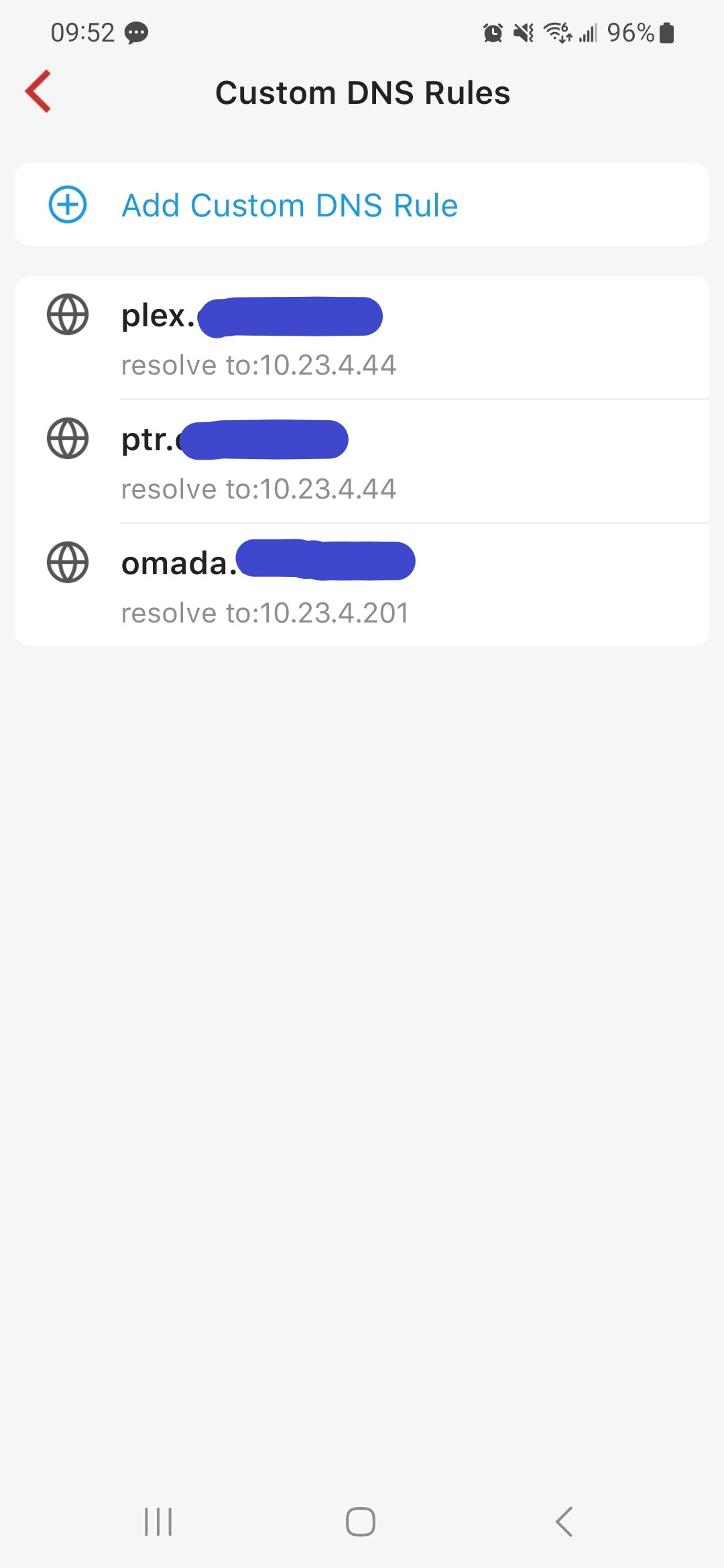
Sure thing. A screenshot of the rules is included below. Things to note:
1) These are all subdomains of the same mydomain.com FQDN which I own.
2) Certain subdomains, such as plex.mydomain.com, are also defined at Cloudflare and point towards the WAN IP of my firewalla, so that I am able to access them externally.
3) Some subdomains, such as omada.mydomain.com I would like only defined on the internal dns.
4) While tinkering, I opted to enable the beta yesterday evening and upon the firewalla reloading with the beta software, all of the domains resolved as expected. However after some time they reverted back to not working / resolving to the global DNS entry depending on the domain. While they were working as expected, I noticed the nameserver returned by the DNS was called "firewalla.int.mydomain.com" and the IP was the gateway / firewalla for the hosts I checked. However once they stopped the IP of the responding nameserver was the same however the name became "UnKnown." After enabling the beta and noticing these domains were working, I made no other configuration changes. The only thing that caused them to stop working seemed to be time.
So in short, the dns configs seem to fall back to ignoring these custom dns entries after some time after they work initially.
-
In my case, the issue was that the device(s) I was testing the custom dns entries on had emergency access enabled as I was testing different firewalla setups. I believe that when emergency access is turned on or monitoring is disabled for a particular device, traffic from that device completely bypasses the internal firewalla dns server. This means everything in the blue box in the flowchart at https://help.firewalla.com/hc/en-us/articles/4570608120979-Firewalla-DNS-Services#h_01FYDNB0ES9W93ZANPZ6YTE1M9 will be bypassed.
Once I disabled emergency access, the custom dns entries worked as expected on my devices.
-

I'm experiencing similar.
I have two public addresses configured to point to my FWGold.
They're accessible externally just fine. Web server is giving content.
If I try to reach those sites from the internal network, I can't reach them. If I nslookup either address, it resolves my external IP.
If I add Custom DNS to the internal IP of the web server, nothing changes. Still external IP.This is actually two issues that need to be solved:
- Why isn't Custom DNS not working?
- Why isn't hairpin routing not working?
-
As for Private Browsing / Browsers with own DNS. Not sure that this is a solution. In any case, this is an issue on multiple devices (with different OSes/Browsers) on the LAN.
If I browse to http://internal.IP.of.Server from any LAN device, I land on the default page configured in my IIS with no issues. Of course, binding doesn't work this way.


Please sign in to leave a comment.
Comments
12 comments