Adding PXE boot options to a Network

I just wanted to share my experience with getting a Use Case up and running in my Home Lab environment. In the past I have used FOG for deploying Images to VM's and Computers on my networks. This required me to either add additional options on the DHCP server, Options 66 and 67, or deploy a DNSMasq server with FOG do layer those options on top of the regular DHCP server. On the surface, Firewalla does not allow that, yet.
I opened a support ticket and they were able to lead me down the right path to update the DHCP scopes on the back-end. Creating a pxe.conf file in ~/.router/config/dhcp/conf/ allows you to add custom options onto your desired scope.
The format is:
dhcp-boot=tag:[target interface],[DHCP Option number],[DHCP Option Value]
So it would come out like:
dhcp-option=tag:br0,67,undionly.kpxe
dhcp-option-force=tag:br0,66,"192.168.100.20"
One snag I hit that seems to be a bug (but might be intentional?) with the DNSMasq itself, Option 66 is not sent to clients. I had to find another option by digging through documentation and forums. This ultimately provided part 2 of my use case.
Format:
dhcp-boot=tag:[Target Interface],[PXE Boot File],[File Source Type],[Target File Server]
Example:
dhcp-boot=tag:br0,undionly.kpxe,tftp,192.168.100.20
Maybe not a lot of users here will need this, but wanted to share this for the few that do, and thanks a heap to support for getting me to the proper file location.
-

Another apology for digging up an old thread. I have been trying to get PXE booting on my FWG for quite awhile now. I was previously using FOG as my target server but then I discovered iventoy which has made things much easier as it supports booting right from an ISO which I know FOG will do but iventoy handles ISOs much better. No more tearing apart ISOs and creating and testing menu option after menu option in FOG which can be exhausting.
I'm specifically looking to add options 66 and 67 in my FWG so I can point it to my OS running iventoy but I would *really* like to also provide vendor classes to the PXE boot so both legacy and UEFI both work correctly.
It seems like from replies to the OP some of managed to get this all working. Could you please provide the steps you did and more importantly what your *.conf file(s) looks like? I have tried a bunch of different configs and I feel like I am almost there but not quite. Given the examples already posted, I think the main part I am missing is how to define the vendor classes but an example of a full working config would be very helpful to me and probably others also.
Thanks.
-
 If your iVentoy server and clients are on the same LAN/VLAN, it should automatically detect Legacy vs. UEFI systems through DHCP snooping.1. iVentoy Configuration:Go to the Configuration tab.
- Set DHCP Server Mode to
External.
2. Firewalla Configuration:- Option 66: Set to your iVentoy IP.
-
Option 67: Set to
iventoy_loader_16000
- Set DHCP Server Mode to


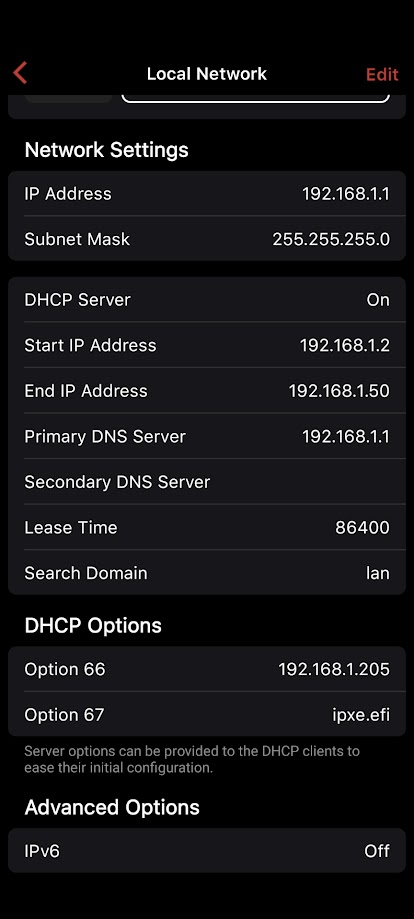
Please sign in to leave a comment.
Comments
5 comments